
8 Common HubSpot Onboarding Mistakes to Avoid for a Cleaner CRM and Better Reporting
HubSpot onboarding determines whether your CRM can support clean handoffs, reliable reporting, useful automation, and day-to-day adoption once...
%20(23).png?width=302&height=302&name=_SD%20web%20assets%202025%20(500%20x%20500%20px)%20(23).png)
18 min read
Eric Smith
:
Updated on March 30, 2026
For many companies, the challenge is not buying the software but building an onboarding process that reflects how revenue teams already work. That is why HubSpot onboarding matters most when the goal is to make the CRM easier to trust in daily use. This risk matters because the CRM becomes the operating system behind lead management, sales activity, service workflows, and reporting.
HubSpot reports that 78% of salespeople consider their CRM effective in improving sales and marketing alignment. The payoff is not just having the software in place. It comes from setting up your HubSpot in a way that helps everyone work from the same process, the same records, and the same definition of progress.
This guide covers:
P.S. Before you start the process of setting up HubSpot, it helps to confirm whether your CRM structure, pipeline stages, automation rules, and reporting needs are clear enough to support a clean launch. At Smith Digital, we help B2B teams align HubSpot setup with real sales and marketing workflows through HubSpot onboarding, CRM configuration, and reporting support.
Plan your HubSpot onboarding to reduce avoidable setup mistakes before they create data issues, adoption problems, or manual workarounds.
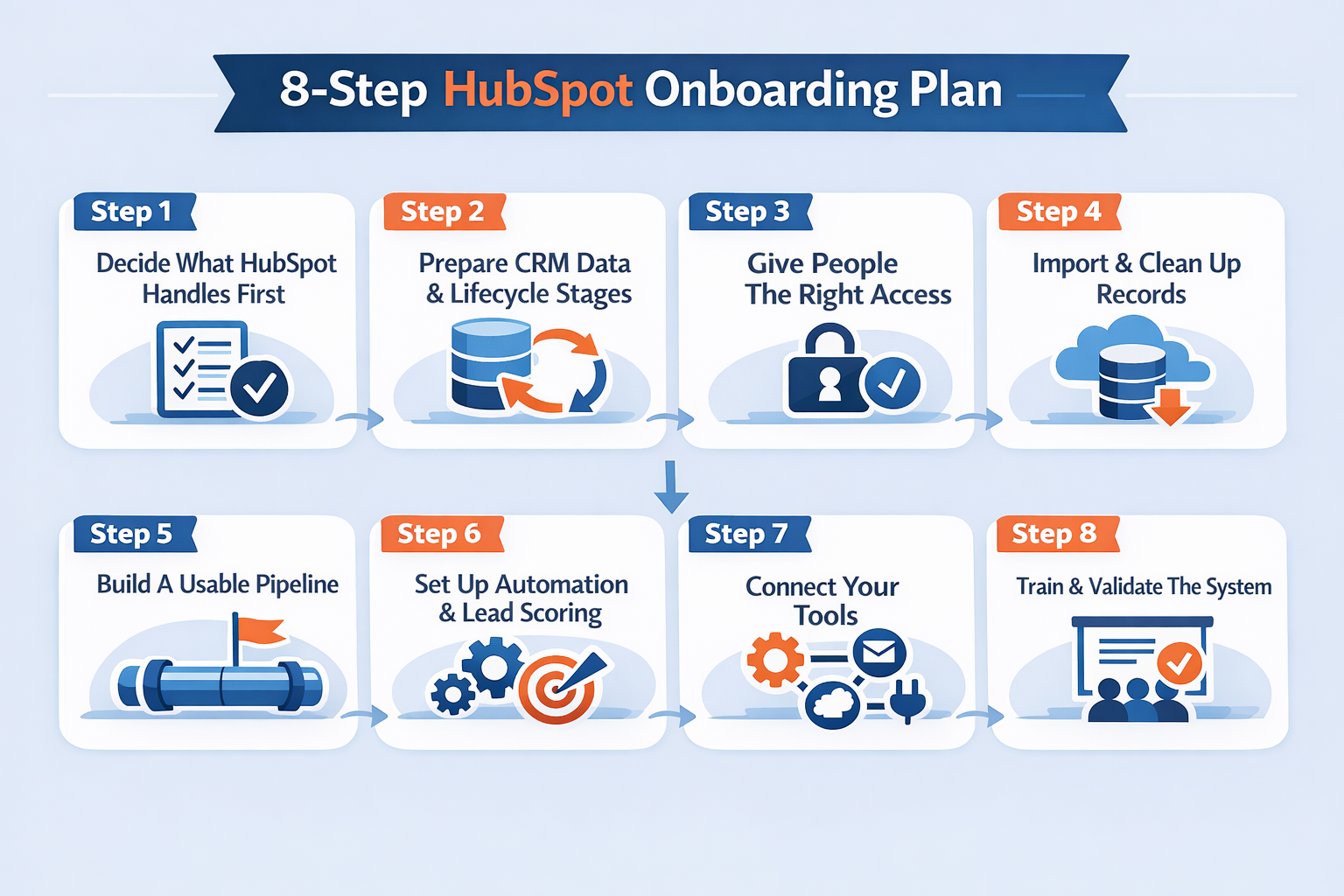
| Step | What To Do |
|---|---|
| Step 1: Define Scope And Success Criteria | Decide which HubSpot hubs are in scope, list the processes that must be live at launch, assign an internal owner, and define what long-term success should look like. |
| Step 2: Prepare CRM Structure And Definitions | Finalize lifecycle stages, lead status values, required contact, company, and deal properties, owner rules, and source tracking before records enter the CRM. |
| Step 3: Configure Account Access And Governance | Add users, group teams, set permissions by role, connect inboxes and calendars where needed, and limit admin access so workflows and settings are controlled. |
| Step 4: Import And Clean Data Carefully | Clean duplicates, standardize values, test field mapping, confirm associations, and run a sample import before moving full contact, company, and deal datasets. |
| Step 5: Build Pipelines Around The Real Sales Process | Define deal stages using real exit criteria, separate different revenue motions into distinct pipelines when needed, and confirm how reps should move opportunities forward. |
| Step 6: Set Core Automation And Routing Rules | Launch only the workflows needed for routing, lifecycle updates, tasks, notifications, lead scoring, and nurture enrollment, then document the trigger and purpose of each one. |
| Step 7: Connect Forms, Integrations, And Inputs | Map forms to the right properties, connect the HubSpot tools that feed your CRM, and verify that each new record updates source data, ownership, and automation correctly. |
| Step 8: Train Users And Validate Before Launch | Train team members on the fields, actions, and dashboards they own, then test forms, workflows, routing, reporting, and permissions before rolling HubSpot out broadly. |
A lot of teams hear “HubSpot onboarding” and picture account setup, a few user logins, and maybe an import. In practice, it is broader than that. You are deciding how HubSpot CMS will handle the daily work your team cares about, such as incoming leads, qualification, sales follow-up, deal movement, nurture, service requests, or customer onboarding.
Therefore, onboarding deserves more attention than a basic software setup, especially because you’re customizing HubSpot around your specific business processes, team workflows, and growth goals.
As a result, the quality of that setup matters from day one. Once forms are live, workflows are active, and the sales team starts relying on the CRM, even small mistakes can create confusion.
A lead may go to the wrong person. A deal stage may mean different things to different reps. A report may show activity without showing whether it is actually creating a pipeline. These issues are usually fixable, but they are much easier to prevent early than to clean up later.
A well-run and personalized HubSpot CRM onboarding process should make the platform feel easier to understand over time, not more complicated. The team should know where information belongs, what happens after a lead comes in, which fields matter, and how the sales pipeline reflects real opportunity movement.
Getting HubSpot live is not the hard part. Getting it set up in a way your team can actually use is where most of the important decisions sit. A strong onboarding experience helps put everything you need in place for a smoother rollout. The best way to avoid a messy launch is to move in a sequence that makes sense.
Start by deciding what HubSpot should handle first and how your records, stages, and permissions should work. Then bring in clean data before building the pipeline, automation, and connected tools around that foundation. That matters because HubSpot offers a lot of flexibility, but platforms like HubSpot only work well when the setup reflects how your team actually operates.

It is tempting to start by turning on features. This usually creates more work. HubSpot is a large platform, and most businesses do not need every part of it set up at once. A cleaner rollout starts with deciding what the system needs to support right now.
For one team, that may mean getting HubSpot CRM and Sales Hub ready for lead follow-up and deal tracking. For another, it may also include Marketing Hub for forms, nurture, and campaign reporting. If customer service or post-sale onboarding needs to live in HubSpot, too, Service Hub may belong in the first phase. The key is to choose the parts that matter most to the business now instead of trying to build the full HubSpot ecosystem in one pass.
This also helps keep the onboarding plan realistic. If the immediate priority is to stop leads from being missed, the first phase should focus on lead capture, routing, follow-up, and a usable pipeline. If the priority is marketing and sales alignment, then lifecycle stages, source tracking, and reporting may need more attention earlier. The clearer that priority is, the easier the rest of the setup becomes.
Before moving on, it helps to answer a simple question: what should be noticeably better once onboarding is complete? Faster lead response, cleaner pipeline visibility, better reporting, and less manual work are all valid answers. That kind of clarity keeps the project grounded in outcomes rather than software features.
Once the scope is clear, the next job is deciding how information should be organized inside the HubSpot platform. This is where many onboarding projects either become much easier later or much harder.
Start with the basics your team will rely on every day. That includes lifecycle stages, lead status, ownership rules, and the fields your team needs on contact, company, and deal records. These may sound like technical setup details, but they shape how people work inside the system and how trustworthy the reporting becomes. A strong data foundation also makes it easier to utilize HubSpot effectively once live activity starts.
Lifecycle stages should show where a lead or customer sits in the broader journey. Lead status should show where that person sits in active sales follow-up. Those two things often get blended, which creates confusion. A contact can stay in the same lifecycle stage while the sales rep moves through several lead status updates. Keeping that distinction clear helps both marketing and sales read the same records correctly.
This is also the right time to decide which details matter enough to capture. Not every field belongs in phase one. If a field will not help with lead routing, qualification, segmentation, pipeline review, or reporting, it may be better to leave it out for now. The same applies to ownership. Everyone should understand where new leads go, when ownership changes, and what should happen if a lead or deal has no clear owner.
Source tracking belongs here, too. If your team wants to know which campaigns, HubSpot forms, or channels are actually creating a pipeline, those source rules need to be settled before forms and imports start creating records. That is especially important when moving data from another CRM to HubSpot, where inconsistent values often create reporting problems later.
Once the CRM rules are clear, the account itself can be set up in a way that feels manageable. This is where the day-to-day user experience starts taking shape.
Not everyone needs access to everything. Sales reps need a clean place to close more deals. Marketing needs forms, lists, workflows, and reporting. Service teams may need tickets, inboxes, or service pipelines. If everyone is given the same level of access, the account becomes harder to manage and easier to break by accident. If access is too limited, users cannot do their jobs without asking for help every time.
A good approach is to think about what each team actually needs to do in HubSpot every day. A HubSpot sales rep may need to log calls, send follow-up emails, move deals through the pipeline, and use meeting links. A marketing user may need to manage forms, email templates, workflows, and contact lists. A service user may need to respond through a shared inbox, update tickets, and manage customer requests. When access is built around real usage, HubSpot feels simpler.
This is also the point to connect essentials like inboxes, calendars, meeting links, and shared communication channels. Those pieces matter because they are part of how people actually use the platform. The goal is not just to create users. It is to make sure the system is ready for real work, especially for teams using HubSpot for the first time.
Read Next: The 25 HubSpot Admin Tasks That Matter Most in 2026
Importing data feels like a technical task, but it affects almost everything that comes after it. If old records come into HubSpot with duplicate entries, unclear field values, or mismatched companies and deals, that confusion spreads into reporting, workflows, and follow-up.
Standardize Values: Clean spreadsheets before import so fields such as industry, company owner, country, lifecycle stage, lead status, and deal stage use one approved format. Fix variations like “USA” vs. “United States,” “MQL” vs. “Marketing Qualified Lead,” or rep names entered as both full names and initials, because inconsistent values break segmentation, routing, and reporting.
Remove Duplicates: Review repeated contacts, companies, and deals before import so HubSpot does not start with duplicate records that split email history, activity timelines, deal ownership, and attribution data. Pay close attention to records with matching email addresses, similar company domains, duplicate deal names, or multiple versions of the same account created by different teams.
Map Fields Carefully: Match each spreadsheet column to the correct HubSpot property so data lands where users expect it and reports stay reliable later. Check whether values belong in default properties, custom properties, date fields, dropdowns, number fields, or multi-select fields, because mapping “Annual Revenue” into a text field or “Lead Source” into the wrong property can distort filters, workflows, and dashboards.
Be Selective With Old Data: Leave out outdated notes, unused properties, and legacy values that do not support current sales, marketing, or service work. That may include closed deals from an old sales process, inactive lifecycle stages, outdated lead source labels, notes tied to former reps, obsolete custom fields, or contact properties no team uses anymore, because too much low-value historical data makes the CRM harder to search, segment, maintain, and trust.
Test A Small Sample First: Import a small batch of contacts, companies, and deals, then open those records in HubSpot and check that property values, associated records, activity history, and date formatting all appear correctly. This helps you catch problems like broken company-contact associations, dropdown values importing as plain text, notes landing in the wrong property, or dates displaying incorrectly, before a full migration creates cleanup work at scale.
Read Next: When Was the Last Time You Cleaned Up Your HubSpot CRM?
Once your records are in place, the next priority is making sure the pipeline reflects how opportunities move in real life. This is one of the most important parts of HubSpot onboarding because the pipeline becomes the shared view of sales progress.
A deal stage should mean something concrete. If one rep moves a deal to “Qualified” after a short intro call and another waits until budget, HubSpot onboarding timeline, and fit are confirmed, that stage stops being useful. The same problem shows up in forecasting. If the team does not use stages the same way, it becomes much harder to understand whether pipeline movement is real or only administrative.
A cleaner pipeline starts with the actual sales journey. Write down the moments that matter. That may include first qualification, discovery, technical review, proposal, negotiation, verbal agreement, and closed won or closed lost. Then define what needs to happen before a deal moves from one stage to the next. That gives the sales team clearer expectations and helps managers review the pipeline with more confidence.
Some businesses may also need more than one pipeline. A new business pipeline often works differently from renewals, partnerships, or post-sale onboarding. Keeping different motions in separate pipelines can make reporting, workflow logic, and day-to-day usage much easier to follow.
Read Next: Scaling B2B Lead Generation with HubSpot: A Powerful Tool for B2B Sales and Marketing Teams
Once the CRM and pipeline are clear, automation becomes much easier to use well. This part of onboarding is about taking the actions that should happen every time and letting HubSpot handle them consistently. That is where a more personalized onboarding approach can make a difference, because the workflows should reflect how the business actually operates rather than a generic template.
| Automation Area | What To Set Up And Why It Matters |
|---|---|
| Lead Routing | Route leads by territory, product line, company size, named account ownership, or form type using the right HubSpot properties. Include a fallback owner for missing values so qualified leads do not sit unassigned or go to the wrong rep. |
| Follow-Up Tasks | Create tasks automatically for demo requests, contact-us forms, pricing inquiries, and other high-intent conversions. Set the owner, due date, and task type so follow-up does not depend on memory or inbox monitoring. |
| Lifecycle Updates | Move contacts between lifecycle stages based on clear triggers such as form fills, meetings booked, sales acceptance, opportunity creation, or closed-won status. Weak stage definitions lead to inflated funnel reporting and unreliable handoff points. |
| Lead Scoring | Score leads using HubSpot's fit signals like industry, company size, and target account status, plus intent signals like pricing page visits, repeat sessions, and demo requests. Poor scoring sends weak leads to sales and hides stronger ones. |
| Internal Alerts | Send alerts for actions that need fast attention, such as demo bookings, pricing requests, repeat visits from target accounts, or deals stalled too long in one stage. Too many low-value alerts create noise, but too few can delay response to buying signals. |
| Nurture Workflows | Enroll leads who are engaged but not sales-ready, such as webinar signups, content downloaders, or early-stage target accounts. Set entry rules, email sequence logic, and exit criteria so marketing does not keep sending generic follow-up. |
| Workflow Documentation | Document each workflow’s trigger, enrollment rules, delays, property updates, notifications, and owner. Without that record, the team loses track of why the workflow exists, what it changes, and who should approve edits. |
By this point, the basic CRM structure is in place. Now the focus shifts to the places where new information enters HubSpot. That usually includes website forms, meeting links, shared inboxes, chat tools, ad connections, and any other connected tool that creates or updates contact, company, or deal records. In practice, this is where teams start seeing how different HubSpot tools work together inside the same system.
Even a well-structured CRM can get messy if connected tools send incomplete or inconsistent information into the system. A form may create a contact without the details needed for lead routing. A meeting link may capture a lead without labeling the source clearly. A connected tool may update the wrong field or trigger the wrong workflow. These are the kinds of issues that make HubSpot feel unreliable, even when the earlier setup was thoughtful.
Website forms are a good place to start. Each one should be reviewed as a real conversion path, not just a data capture tool. What fields does the visitor fill out? What happens after they submit? Does the right person get notified? Does the right follow-up happen? Does the source get recorded in a useful way? The same logic applies to meeting links, inboxes, and any other tool connected to the HubSpot account.
The goal is simple. When a new lead or contact enters HubSpot, the record should make sense, and the next action should be clear.
Read Next: Build a High-Converting HubSpot Website: Real Tactics for More Leads & Sales
A complete and well-thought-out onboarding can still break down in daily use. The final part of onboarding should make sure each team has a deep understanding of HubSpot and catch problems before live activity depends on it.
Train By Role: Show sales reps how to assign leads, update deal stages, log activity, and complete follow-up tasks correctly. Train marketing on forms, lists, campaign attribution, and lead status rules, and train service teams on ticket pipelines, handoff visibility, and contact history where relevant.
Use Real Scenarios: Base HubSpot training on actual workflows your team will use, such as a demo request coming through a form, a sales rep updating a deal after discovery, or marketing checking whether a contact entered the right nurture workflow. This makes problems easier to spot before they affect live records.
Test Key Actions: Submit test forms, book meetings, create deals, reassign owners, and trigger workflows to confirm that fields populate correctly, records associate properly, notifications are sent, and automation runs as expected. This helps catch broken logic, missing properties, and weak handoff points before rollout.
Review Reporting Early: Open the dashboards and check whether lifecycle stage changes, deal movement, lead source reporting, and owner-based views match what the team expects to measure. If those reports look wrong now, they will be harder to trust once more data enters the system.
Create A Simple Internal Onboarding Checklist: Leave the team with a short operating guide that shows which fields are required, when deals should move stages, how lifecycle stages should be used, who owns follow-up after key conversions, and where to report HubSpot issues internally. This reduces guesswork once the portal is live.
Read Next:

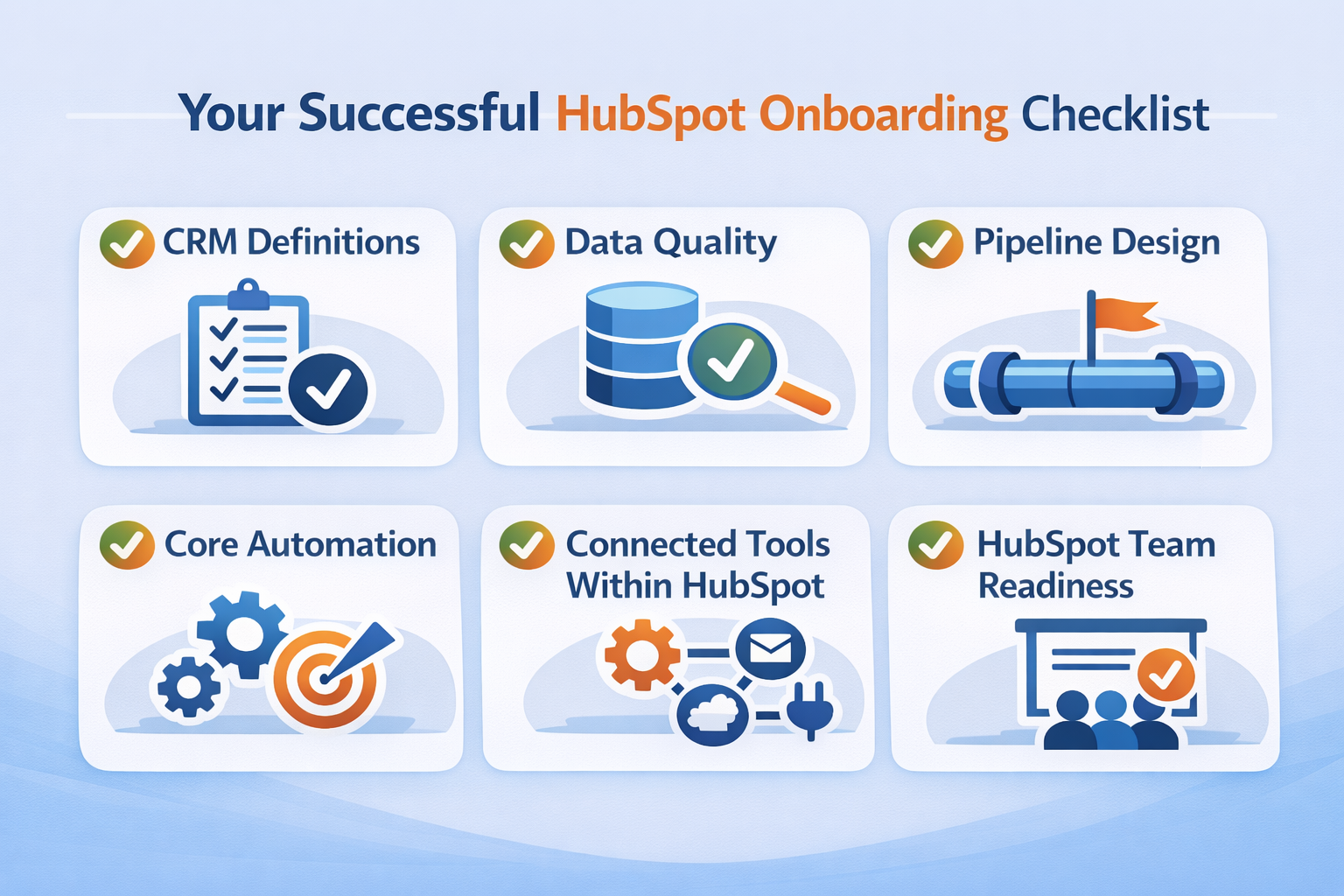
The step-by-step sequence above shows how to move through the setup. A second way to evaluate HubSpot onboarding is to check whether the major pieces are in place before launch. This is useful when the business wants to assess whether the onboarding plan is complete enough to support real use.
| Component | What Should Be In Place | What Happens If It Is Weak |
|---|---|---|
| CRM Definitions | Lifecycle stages, lead status, required properties, owner rules, and handoff criteria are defined before records are imported or workflows are built. | Teams update records differently, automation misfires, and lifecycle or pipeline reporting becomes unreliable. |
| Data Quality | Imports are cleaned for duplicate contacts, inconsistent values, blank key fields, outdated notes, and unused custom properties before data enters HubSpot. | Reps work from messy records, segmentation gets weaker, and cleanup work grows after launch. |
| Pipeline Design | Deal stages match real sales checkpoints such as qualified, meeting booked, proposal sent, and closed outcome, with clear exit criteria for each stage. | Pipeline movement becomes subjective, stage aging loses meaning, and forecast accuracy drops. |
| Core Automation | Routing, follow-up tasks, lifecycle updates, alerts, and nurture workflows are set up around the team’s real process, not just default automation. | Leads sit untouched, records update unpredictably, and users stop trusting the system. |
| Connected Tools Within HubSpot | Forms, calendars, inboxes, meeting links, and other connected systems pass clean values into the right HubSpot properties and record associations. | New records enter with missing fields, wrong source labels, broken ownership, or weak next-step logic. |
| HubSpot Team Readiness | Sales, marketing, and service users know which fields matter, when records should move through stages, and how to handle common tasks in HubSpot. | Adoption drops, process consistency slips, and teams fall back on spreadsheets, side notes, or manual workarounds. |
Not every business needs the same kind of onboarding help. Some teams already know how they want the CRM systems and pipelines to work and mainly need platform guidance. Others are still deciding how sales, marketing, service, and reporting should fit together inside HubSpot. The more uncertainty there is in the process itself, the more support can matter.
The support decision is usually easier when you look at the real scope. If the project includes clean data, a simple sales process, and a small user group, internal setup may be realistic. If it includes CRM redesign, multiple hubs, workflow automation, migrations, or customer onboarding logic, the project usually benefits from more hands-on help and a more personalized onboarding approach.
In-house onboarding tends to work best when the team already has a clear operating model. That means the business knows how leads should be qualified, how deals should move, who owns what, and what kind of reporting it needs. In that situation, HubSpot becomes a tool the team is configuring around an already understood process.
This route is also more realistic when the project stays narrow. A smaller HubSpot CRM and Sales Hub rollout is easier to manage internally than a broader implementation involving Marketing Hub, Service Hub, forms, nurture, and more complex automation. Teams taking this route can also use HubSpot Academy to build baseline knowledge before launch.
Some teams mainly need guided onboarding delivered through HubSpot’s own onboarding services. Others need dedicated assistance from the HubSpot onboarding partner because the setup includes process design, data cleanup, workflow planning, and decisions that go beyond software basics. There are also cases where an internal team can manage the work if the scope is narrow and ownership is clear.
| Option | Best Fit | What To Verify Before Choosing |
|---|---|---|
| HubSpot Onboarding Services | Teams that want structured onboarding tied to the hubs they purchased and the goals they want to reach first | Confirm what is included, how much strategic guidance is offered, how long onboarding lasts, and what support remains afterward |
| Internal Setup | Teams with a narrow scope, clear internal processes, and someone who can own setup decisions and user support | Confirm who will handle CRM setup, imports, workflow questions, training, and post-launch fixes |
| Partner Agency | Teams that need technical and strategic support across CRM setup, reporting, automation, migration, or a broader sales and marketing process | Ask how the agency handles planning, documentation, testing, comprehensive training, and ongoing support before committing. Additionally, inquire what the onboarding cost covers. |
A HubSpot solutions partner can make more sense when the business wants HubSpot onboarding to do more than activate tools. This includes cases where the CRM needs to reflect a more specific sales process, where multiple teams need to work from the same system, or where post-launch support is likely to matter. In those situations, a certified HubSpot partner is often better positioned to deliver a more complete onboarding scope.
The most useful partner questions are the ones that show how the work will actually be handled. A strong onboarding partner should be able to explain its process in plain language, not just list certifications or tools.
The goal is to understand whether the team can deliver a smooth HubSpot onboarding experience, not just complete technical setup. That clarity makes it easier to identify the right onboarding partner for your team.
Project Approach: Ask how the onboarding plan is scoped, what discovery inputs are used, how decisions are documented, and what the sequence looks like from kickoff through setup, testing, and launch. This shows whether the project follows a real process or just moves straight into tool configuration.
CRM Setup: The HubSpot expert should be able to explain how lifecycle stages, lead status, required properties, owner rules, handoff criteria, and pipeline stages are defined before the portal is built. Weak answers here usually lead to inconsistent routing, messy reporting, and uneven CRM usage after launch.
Data Imports: Review how spreadsheets are checked for duplicate contacts, inconsistent dropdown values, blank required fields, outdated notes, and incorrect property mapping before import. A reliable process should also include a sample import and a review of how records, associations, and field values appear inside HubSpot.
Workflow Planning: Focus on how the HubSpot certified partner decides which workflows belong in the initial launch, such as lead routing, follow-up tasks, lifecycle updates, alerts, or nurture sequences, and which automations should wait until the team has live usage data. This part of the onboarding process helps prevent a portal from becoming overbuilt before the core process is stable.
Training: Pay attention to what each team will actually be shown before launch, including how sales updates deals, how marketing handles forms and attribution, and how service teams use tickets or contact history where relevant. Strong onboarding should leave behind training that matches daily work, not generic tool walkthroughs.
Ongoing Support: Clarify what happens after rollout if the team needs help with cleanup, dashboard fixes, workflow issues, property changes, or added automation. This tells you whether the partner treats onboarding as a one-time handoff or as the start of a more usable long-term system. It also helps you assess whether you are working with certified HubSpot experts who can support the system after launch, not just during implementation.
Read Next: HubSpot Admins: Hire In-House or Partner with an Agency?
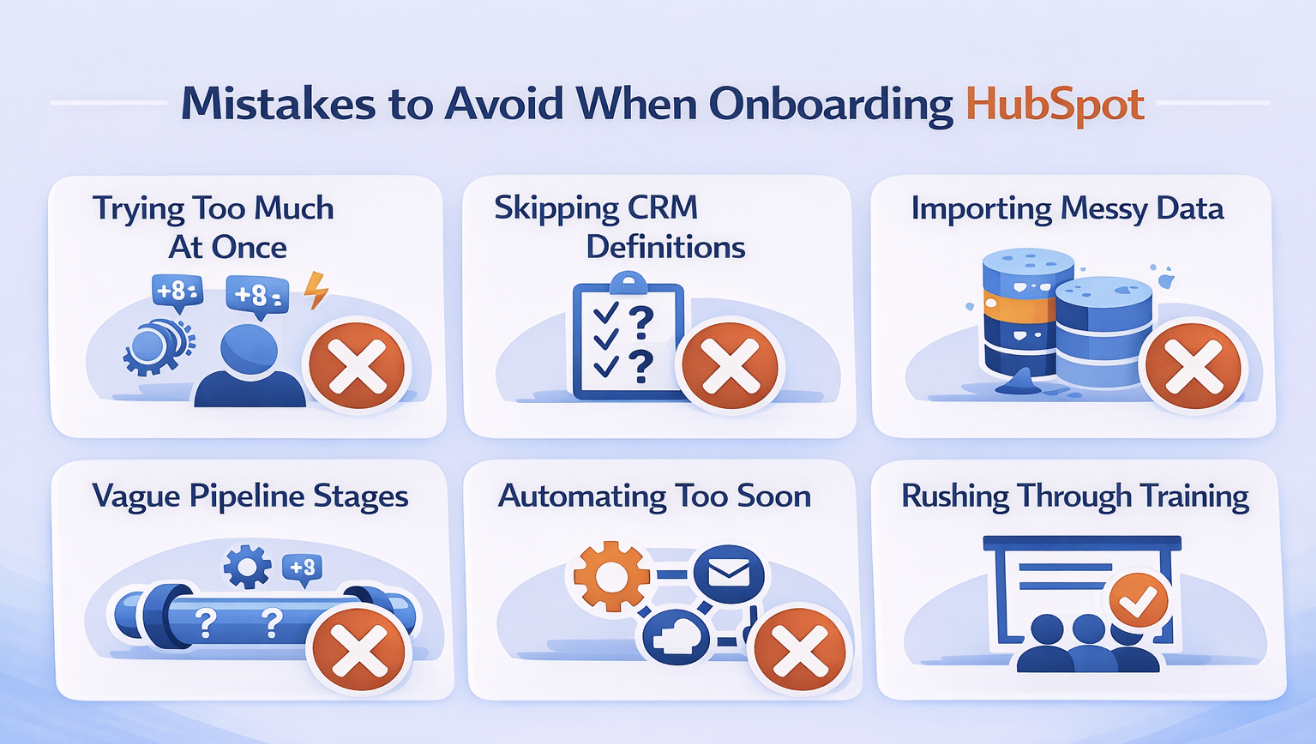
HubSpot CMS onboarding problems often show up after the system is already live. The account may look finished, but the team still feels friction because some of the setup choices were made too quickly or without enough clarity.

Trying To Set Up Too Much At Once: Phase one often gets overloaded with multiple HubSpot hubs, advanced workflows, custom properties, edge-case automation, and reporting requests that the team is not ready to manage yet. That makes the rollout harder to test, harder to explain, and more likely to create confusion when users are still learning the core process.
Skipping CRM Definitions Early: Lifecycle stages, lead status, owner rules, required properties, qualification criteria, and handoff points should be defined before imports, workflows, or dashboards are built. If those definitions stay vague, the system reflects that confusion through inconsistent record updates, unreliable reporting, and weak sales-marketing alignment.
Importing Messy Data: Duplicate contacts, inconsistent dropdown values, outdated notes, blank required fields, and obsolete custom properties can all enter HubSpot during migration if spreadsheets are not cleaned first. That creates messy segmentation, broken automation, and extra cleanup work once reps are already using live records.
Using Vague Pipeline Stages: Deal stages should reflect real sales checkpoints, such as qualified, meeting booked, proposal sent, verbal agreement, or closed outcome, with clear exit criteria for each stage. If reps cannot explain when a deal moves forward, stage progression becomes subjective, and forecast reviews lose credibility.
Automating Before The Process Is Clear: Workflows for routing, follow-up tasks, lifecycle updates, lead scoring, or nurture should be built around a process the team already understands and agrees on. When automation is added before ownership rules, qualification logic, or handoff steps are settled, HubSpot starts scaling confusion instead of reducing manual work.
Treating Training Like A Final Box To Check: Training should show sales, marketing, and service users how to complete the real actions they handle every day, such as updating deal stages, working assigned leads, managing forms, checking attribution, or reviewing ticket history. If onboarding ends with a generic walkthrough instead of role-based practice, adoption drops, and teams fall back on spreadsheets, notes, or side processes.
Read Next:
The best HubSpot onboarding projects make the platform easier to trust from the start. That usually happens when the business stays focused on process clarity first, then builds the platform around that reality instead of trying to configure every HubSpot option at once.
Focus The First Rollout: Choose the part of HubSpot that solves the most immediate problem, then expand once the team is using it confidently.
Keep The Setup Easy To Explain: If a rep, marketer, or service user cannot understand what a field, stage, or workflow is doing, the setup probably needs simplification.
Use Early Testing To Protect Trust: Small issues caught before launch are much easier to fix than habits formed after the team starts depending on the system.
If you are trying to set up HubSpot in a way that supports cleaner lead handling, clearer reporting, and a more usable day-to-day process, it helps to review the onboarding plan before the account becomes harder to unwind.
At Smith Digital, we help B2B teams integrate HubSpot around real sales and marketing workflows, with support across CRM structure, automation planning, reporting, and rollout clarity.
Plan your HubSpot onboarding to reduce setup risk, improve adoption, and build a HubSpot foundation your team can actually use.
HubSpot implementation process involves the work required to make the platform usable in daily operations. That can include CRM setup, lifecycle stages, fields, pipeline design, forms, workflows, reporting, user setup, and training. The exact scope depends on which hubs are being implemented and what the business wants HubSpot to handle first.
The Hub onboarding timeline depends on scope, number of hubs, data quality, and how much process work still needs to be decided. A smaller setup focused on core CRM or Sales Hub can move faster than a broader rollout involving marketing automation, service workflows, or customer onboarding. Delays often come from unresolved definitions and messy data more than from the software itself.
HubSpot onboarding services are structured setup programs designed to help customers get the platform working around their goals and purchased products. They typically include guidance on setup, implementation priorities, and how to use HubSpot effectively during the onboarding period. The depth of support depends on the service and product tier involved.
Whether a HubSpot specialist is required depends on the product and purchasing path, but some onboarding work is always needed if HubSpot is going to be useful. The important question is not whether onboarding exists. It is whether the CRM, pipeline, workflows, and reporting are being set up clearly enough to support real usage.
Yes, some teams can set up the HubSpot platform internally, especially if the scope is narrow and the business already understands how it wants leads, deals, and reporting to work. Internal setup is most likely to succeed when one person can own the rollout, answer setup questions, and support users after launch. Without that, self-setup often creates more cleanup later.
HubSpot is usually easier to implement than heavier enterprise platforms, but the difficulty depends on what the business is trying to make the system do. A basic setup can feel straightforward. A broader rollout with multiple hubs, automation, pipeline design, reporting, and connected tools requires more planning. The harder part is often not learning the software. It is deciding how the business wants the system to work.
HubSpot onboarding determines whether your CRM can support clean handoffs, reliable reporting, useful automation, and day-to-day adoption once...

Before you dive into another long-term outsourced BDR contract, ask yourself: Are you ready to prototype success or waste months and budget on...
If your team relies on HubSpot but no one truly owns it, your growth is at risk. Marketing slows down, sales waste time chasing bad data, and...